Authentication Flow
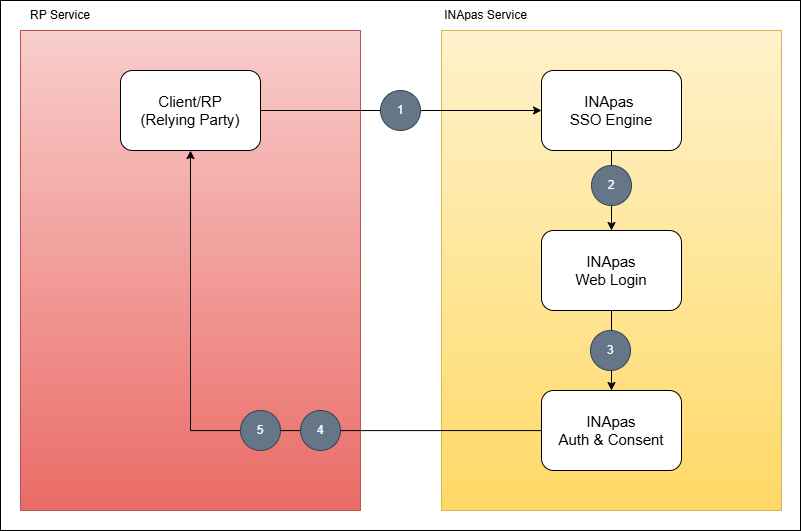
1. RP/Client Request Authentication (Click Login with INApas)
Process:
The Relying Party (RP) or Client sends an authentication request to the INApas SSO endpoint /sso/oauth2/auth.
Technical Details:
The request is sent via HTTPS protocol with GET or POST method.
Important parameters sent include:
- client_id: The unique ID of the client application registered with INApas.
- redirect_uri: The URL to which the user is returned after authentication to receive a token or authorization code.
- response_type: Set to
codefor authorization code flow. - scope: Specifies the scope of the data to be accessed (e.g., user profile).
- state: A unique token to prevent CSRF (Cross-Site Request Forgery) attacks.
2. INApas Redirects to Web Login Page
Process:
Users are redirected to the INApas web login page to enter their credentials.
Technical Details:
-
INApas SSO engine endpoint redirected to INApas web login page (QR Code)
-
This endpoint also includes an additional authentication mechanism (LDA) to enhance security.
-
The backend system validates user credentials against an integrated database or Identity Provider (OP).
3. Authentication & Consent Approval
Process:
Upon successful login, users are directed to a consent page to authorize access to their data according to the requested scope.
Technical Details:
-
The user can view the list of permissions requested by the application.
-
If the user grants consent, the server will generate an authorization code.
-
If the user declines, the process will be terminated and an error will be returned to the RP.
4. Redirect to RP Callback URL
Process:
Once approval is granted, the user is redirected to the callback URL specified by the RP with the authorization code included.
Technical Details:
The callback URL will accept parameters such as:
-
code: A temporary authorization code used to obtain the access token. -
state: A unique parameter used for security validation.
The RP must validate the state parameter to ensure the integrity of the request.
5. Token Exchange
Process:
The RP uses the authorization code to request an access token from INApas via the /sso/oauth2/token endpoint.
Technical Details:
This request uses the POST method with parameters such as:
-
client_idandclient_secret: Used for application authentication. -
Code: Authorization code received in the previous step. -
redirect_uri: Must match the previously registered URL. -
grant_type: Set to authorization_code.
Response:
- If valid, the server will return the access token, refresh token (optional), and additional information such as token duration.